
GRAPH: COMBINING LIGHT SOURCES
|
|
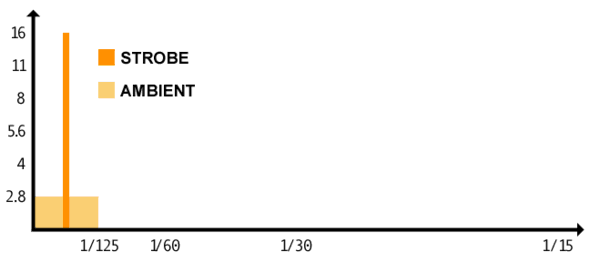
Typical Strobe Exposure: Above is a graph of a typical Strobe exposure. The Strobe or Flash is an efficient light, in which the power is stored and then released in an intense burst of energy lasting from about 1/5,000th of a second to as little as 1/20,000th of a second. In the hypothetical exposure, the Strobe measures f16 using a Flash Meter. The Camera requires 1/125th of a second Shutter Speed for the timing of the circuitry to open the Mirror and Shutter, and trigger the Strobe or Flash. During the 1/125th of a second exposure, Continuous Light from Ambient sources records on the film. In indoor situations, the Ambient light is generally weak, as shown in the hypothetical exposure, and it would require an Aperture setting of f2.8. When the Exposure is made at f16, the Continuous Light from Ambient sources would almost not record on the film as it is fiver Stops less light. The scene would be truly exposed for only a fraction of the 1/125th of a second Shutter Speed. |
|
|
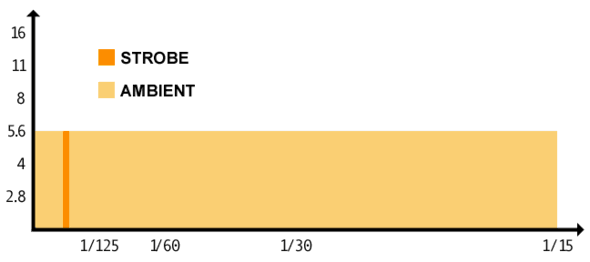
Combining Strobe and Continuous Light: The Strobe has a relatively fixed duration, or span or time. It may be changed minutely by reducing the output, making its duration shorter. The length of the exposure made by the Camera Shutter can be lengthened to allow the film to record more Continuous Light. You may be able to reduce the power of the Strobe and/or extend the Exposure Time in order to bring the required Aperture Settings into agreement. Extending the Exposure Time may allow weak Ambient Light Sources, such as candles or bulbs, to illuminate better. Extending the Exposure Time may also allow Computer Monitors to expose fully, showing no effects of the screen "Refresh Rate." Because the Strobe or Flash will weaken with increased distance from the source, combining Strobe and Continuous Light is often required to make a photograph that exceeds the distance-related limitations of the Strobe. |
STROBE AND CONTINUOUS LIGHT
It is very important to understand the difference between Strobe and Continuous Light, as well as the difference between Direct Light and Ambient Light. The Strobe or Flash is an extremely brief light source that can "freeze" the action of many subjects and diminish the effects of camera movement. A Continuous Light is constantly emitting light as long as it is turned on or burning.
Direct Light comes directly from a source with specific directional focus or Light Control, such as a Strobe in a reflective cone, whereas Ambient Light comes from many directions. Continuous Light is often associated with Ambient Light because many Continuous Light sources, such as lamps and candles, are omnidirectional. Continuous Light sources can also be directed, in order to produce very little Ambient Light. Strobes may reflect off of various surfaces, creating a certain amount of Ambient Light. In the graphs above, the Ambient Light is from a Continuous Light Source, as it is consistent during the full time of the exposure.
In many Studio Lighting scenarios, Strobes are used as large light sources to create Ambient Light and one key Strobe is used directionally to produce strong highlights. Ambient Light is typically used to reduce or eliminate shadows. For more, see
Applying the principles of time and light, as required to combine Strobe and Continuous Light, will help you understand the effects of combining many light sources. It is possible to measure a light source, such as candle flame, and to add an additional light source, such as blue light in the shadow areas of the photograph, once you are able to determine how much you want the additional light to effect the exposure.
BLACK AND WHITE PRINTING
If you practice Black and White Photographic Printing, you can apply the principles of combining light sources to the printing process. Just like making a photograph with a Camera, making a Photographic Print is based on Light (adjusted by the Enlarger Aperture) and Time (adjusted by the Enlarger Timer) with variables being the sensitivity of the paper and filters applied to the Enlarger Lens. You may use different Contrast Filters in sequence to combine the effects of different contrasts. For example, if different areas of the print would benefit from exposure at different contrasts, you may make part of the exposure with a lower Contrast Filter, such as a "1", to render details in an overexposed area, and then make the additional portion of the exposure with a higher Contrast Filter, such as a 3 1/2, to increase the contrast in the normal or underexposed portion of the Negative.
Steps in the Multiple Stage or Multiple Contrast Printing Process include:
1) Make a Test Strip or Test Print using a Low Contrast Filter to determine the exposure needed to render details in the dense areas of the negative on Multicontrast Paper.
2) Expose a new Test Strip or Test Print using a Low Contrast Filter to the determined amount of time, leaving the unprocessed paper on the easel. Change the lens filter to a High Contrast Filter and create a series of tests using time incriments to determine the desired Exposure and Contrast to finish the Print. Note: If you change the Aperture between Steps 1 and 2, you will need to keep a record of this and do the same in the next step. It is not advisable, but may be necessary if using an extremely dense filter.
3) Print the Negative combining the exposure data from the first Test with that of the second Test on Multicontrast Paper to create a Multiple Stage Print.
4) If you decide to make changes in Exposure Time or Contrast in one or the other stages, you may need to retest both stages.
HIFC FIELD GUIDE | Return to Exposure | info@houstonculture.org
Updated Oct. 2001